
State Farm®
State Farm InsuranceFinance
4.635.81K Reviews
- Version
- 10.169.0
- Installs
- 10.00M
- Age Rating
- Everyone
Screenshots
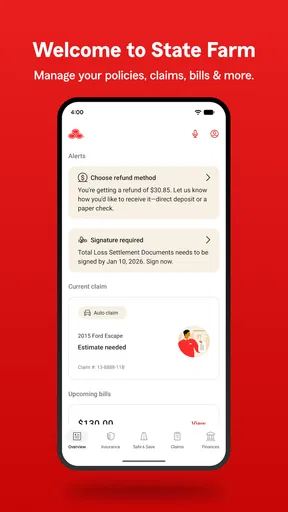
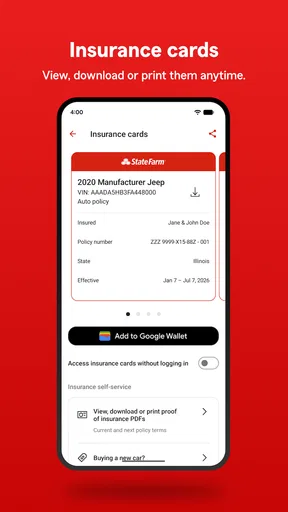
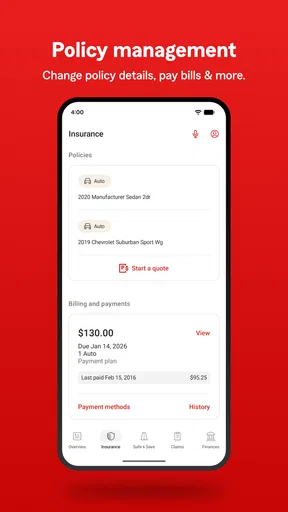
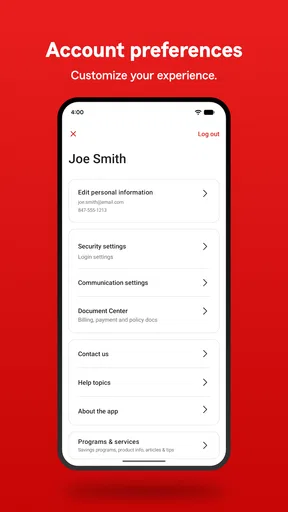
Our Review of State Farm®
 Analysis by Appyee
I use a mobile insurance app for one main reason: I want routine account tasks to take less time than opening a browser, searching for paperwork, or calling for help. State Farm® is built around that practical idea. It puts access to State Farm accounts, policies, and insurance ID cards in one place, while also giving me a mobile way to stay connected with the company that manages my coverage.
That focus makes it different from a general money-management app. It is not trying to track every bank account, build a household budget, or replace a full financial planner. It is a dedicated insurance companion from State Farm Insurance, and I found it most useful when I treated it as a repeatable tool for checking coverage details, retrieving documents, and handling everyday policy-related moments.
The app is free, available for Everyone, and sits in the Finance category. Its average rating is 4.6 from around 481 thousand ratings, with more than 10 million installs, so it is clearly used well beyond a small group of existing customers. State Farm has maintained the app since its release on April 29, 2010, and the current version is 10.165.1 for devices running at least OS 10.
How I use it for the everyday insurance workflow
My preferred starting point is simple: I open the app when I need a specific answer, rather than browsing around without a task in mind. The first useful habit is making sure the account view reflects the policies I actually manage. Once that is in place, the app becomes a quick reference point instead of another place where I have to remember where information is stored.
For a normal check, I would look at the relevant policy, confirm that I am viewing the right account, and then open the insurance ID card when I need proof of coverage. That sequence matters because insurance information often becomes urgent at inconvenient times. A digital card is more useful when I already know how to reach it, rather than discovering the path while standing beside a vehicle or speaking with another person.
A realistic example is borrowing a family member’s car and realizing that someone may ask for insurance information. With this app, I can sign in, move to the appropriate policy area, and bring up the ID card instead of searching through email attachments or a drawer at home. I still need to pay attention to which vehicle and policy I am looking at, but the mobile format makes the document much easier to reach.
I also like using it before a trip or a busy week. I can check that the relevant policy information is available on my phone, review the account area, and avoid leaving the task until I am already dealing with a roadside problem or administrative request. This is not a dramatic feature, but it is the kind of small preparation that makes a finance app genuinely useful.
The same workflow helps when a household has several policies. Instead of treating every document as a separate search, I use the account as the starting point and then choose the policy that matches the situation. That reduces a common mistake in insurance apps: finding a valid-looking document that belongs to the wrong vehicle, person, or coverage context.
For me, the app works best as a companion to an existing State Farm relationship. It does not remove the need to understand the policy itself. A digital card can show proof of insurance, but it is not a substitute for reading exclusions, limits, deductibles, or renewal information. I use the app to reach those details more conveniently, not to make coverage decisions from a quick glance.
What I check before relying on the app
The first check is account access. A mobile insurance tool is only useful if I can get into it when I need it, so I prefer to sign in at a calm moment rather than during an emergency. I also make sure I know which account credentials belong to the policyholder and which information may be needed if the app asks me to verify access.
The second check is document relevance. I do not assume that the first ID card I see is automatically the one I need. I look at the policy and vehicle details before presenting it. This is an easy habit to overlook, especially when several cards are available, but it is one of the most valuable ways to avoid confusion.
The third check is whether the app is current on my device. State Farm lists the current version as 10.165.1 and requires OS 10 or newer. That makes compatibility a practical consideration for anyone using an older phone. If the device cannot meet that minimum, I would plan another way to access account information before an urgent need appears.
I also keep a backup mindset. A mobile ID card is convenient, but phones lose battery, connections fail, and sign-in problems happen. I would not make the app my only preparation for a long trip or a situation where proof of insurance is especially important. Having the necessary details available through another permitted method is sensible, particularly if I know I will be away from reliable service.
Settings and account habits worth checking
The most useful “settings” are not flashy switches. They are the account and device choices that determine whether the app is ready when I need it. I check that the correct State Farm account is being used, that my phone is protected with its normal screen security, and that I understand how the app behaves when I sign out or change devices.
I am careful about notifications as well. Alerts can be helpful when they relate to account activity or a task I need to remember, but I do not want sensitive information displayed openly on a lock screen. My preference is to keep notification content discreet and open the app when I want to see the details. That is a phone habit rather than a promise about a particular State Farm setting, but it makes the overall experience more private.
Another worthwhile check is the app’s place in my phone layout. I keep it near other essential travel and vehicle tools, not buried in a folder I rarely open. That sounds minor, yet it supports a repeatable workflow: when I need an insurance card, I know where to begin. The fewer steps between the need and the document, the less likely I am to abandon the task.
I also review the account after a major change in my life, such as replacing a vehicle, changing who uses a car, or updating contact details through the appropriate State Farm process. The app can be a convenient place to inspect what is associated with the account, but I do not assume that looking at a screen completes every policy change. When the situation affects coverage, I treat the app as a confirmation and access tool, not as a reason to skip the formal process.
That distinction is important for new users. The app may make insurance feel more immediate, but convenience does not mean every action has the same effect as speaking with an agent or completing a required transaction. If I am unsure whether a change affects a policy, I would use the app to locate the account information and then contact State Farm through the appropriate channel rather than guessing.
Faster patterns that save me time
Experienced use comes from repeating a few sensible patterns. My first is to open the app with a purpose: “find the ID card,” “check this policy,” or “review the account.” That prevents me from wandering through sections and helps me notice quickly if I have opened the wrong policy.
My second pattern is checking documents before I leave home. If I know I will need proof of insurance, I open the relevant area in advance and make sure I can reach the card. I do not rely on memory, and I do not wait until I am in a parking lot with someone asking for information. This habit turns a potentially stressful interaction into a short retrieval task.
My third pattern is using the app as a shared household reference without sharing my login. If another person needs policy information, I can view the correct document myself and provide only what is appropriate. I would not hand over account credentials simply because someone wants to see an ID card. Separating document access from password sharing is a small but important security trade-off.
For renewal or administrative periods, I use the app as a checklist anchor. I review the policies shown, confirm that the account looks familiar, and note anything that deserves a closer conversation. The value is not that the app makes every decision for me; it gives me a consistent place to begin, which makes it easier to spot questions before they become urgent.
Another useful pattern is taking a moment to identify the policy before saving or presenting anything. When an app contains information for multiple vehicles or types of coverage, speed can create its own risk. I would rather spend a few seconds verifying the label than send someone an irrelevant card or misunderstand which protection applies.
These habits also answer a common question: is the app useful if I already have paper documents? Yes, if I frequently need mobile access or dislike carrying paperwork. Paper may still be a good backup, especially for travel or low-battery situations. I see the digital app and physical records as complementary rather than competing choices.
Where the app is strong, and where it is not enough
The strongest part of the experience is its narrow purpose. Because it comes from State Farm Insurance, the app is more relevant to a State Farm customer than a general finance app would be. A budgeting tool may show spending patterns, and a bank app may handle deposits or transfers, but neither is the natural place to retrieve a State Farm insurance ID card or inspect State Farm policy information.
That specialization is also the main limitation. If I want to compare policies from several insurers, manage unrelated financial accounts, or shop for coverage across companies, this is not the right central dashboard. Its usefulness depends on having a State Farm account and wanting mobile access to that relationship. Someone who is not a State Farm customer would have little reason to install it.
I would also avoid judging the app by the same standard as a full insurance agency relationship. A screen can make information easier to reach, but it cannot replace personal advice when a claim, coverage dispute, unusual vehicle arrangement, or major life change requires interpretation. In those situations, the app is helpful for gathering account details, but a conversation with a qualified State Farm representative may be the better next step.
Another trade-off is convenience versus concentration. Having policy information on a phone is efficient, but it means I need to protect the device and pay attention to where sensitive screens appear. I would not open the app on a shared or unsecured device casually, and I would avoid leaving account details visible after finishing a task.
People also ask whether a free app can be useful without creating extra costs. In this case, the app itself is free, which removes a direct purchase barrier. That does not change the price of insurance or any separate service connected to the account. I think of it as a no-cost access layer for an existing insurance relationship, not as a way to make coverage free.
The Everyone content rating makes it approachable for a broad audience, but age suitability should not be confused with account eligibility. A person may be able to install a finance app and still need the appropriate State Farm account relationship to use its insurance features meaningfully.
Who should use it, and who should choose something else
I would recommend it to State Farm customers who regularly need policy information away from home, manage more than one policy, or want a dependable mobile route to insurance ID cards. It is especially practical for drivers who dislike carrying paper documents and for households that need to check which policy applies before sharing proof of coverage.
I would also recommend it to people who prefer self-service for simple questions. If I only need to locate account information or retrieve a document, opening the app is usually more direct than waiting for assistance. The benefit grows when I establish the workflow ahead of time and know exactly where the relevant policy information lives.
I would not recommend making it the main finance app for someone who wants budgeting, investments, banking, bill analysis, or a consolidated view of several insurers. A general financial dashboard will be better for those goals. Likewise, a person who rarely uses a smartphone, has an incompatible older device, or strongly prefers paper may gain little from installing it.
It is also not my first choice for complicated insurance decisions. When the question is “what does this coverage mean in my unusual situation?” rather than “where is my policy information?”, I would use the app to prepare and then seek direct guidance. That is not a failure of the app; it is a sensible boundary between document access and professional interpretation.
My final view after building a routine around it
State Farm® succeeds because it handles a specific job without asking me to turn insurance into a larger financial project. The most valuable experience comes from combining the app with simple habits: confirm the right account, identify the right policy, retrieve documents before they are needed, protect the phone, and keep another backup for moments when mobile access is unavailable.
I appreciate that the app can make a routine insurance task feel less cumbersome, especially when I am away from home or dealing with more than one policy. Its large user base and 4.6 average rating suggest that this focused approach works for many people, but those figures do not change the basic trade-off: the app is most useful inside the State Farm ecosystem and much less useful outside it.
My recommendation is therefore straightforward. If you already use State Farm Insurance and want quick account, policy, and ID-card access, I think the free app is worth keeping on a compatible phone. If you need broad financial management, insurer comparison, or detailed advice for a complicated situation, I would pair it with a different tool or a direct conversation. The best way to get value from it is not simply installing it, but turning it into a prepared, repeatable insurance routine.
Privacy and Permissions
See what permissions an app requests and how it handles your data.
- Location
- approximate location (network-based), precise location (GPS and network-based)
- Photos/Media/Files
- read the contents of your USB storage, modify or delete the contents of your USB storage
- Storage
- read the contents of your USB storage, modify or delete the contents of your USB storage
- Camera
- take pictures and videos
- Microphone
- record audio
- Wi-Fi connection information
- view Wi-Fi connections
- Other
- view network connections, pair with Bluetooth devices, access Bluetooth settings, full network access, change your audio settings, run at startup, control vibration, prevent device from sleeping
Verdict
Strengths of State Farm®
- Quick access to insurance cards, policy details, and billing information.
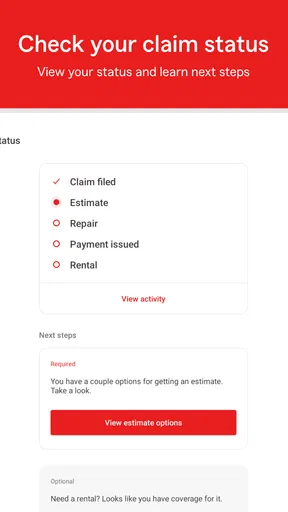
- Convenient claim filing with photo uploads and status tracking.
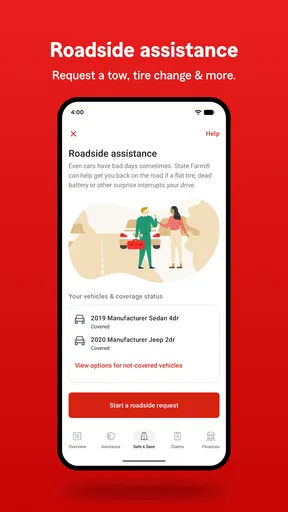
- Roadside assistance can be requested directly from the app.
- Secure login options help protect sensitive account information.
- Useful tools for finding agents, repair shops, and nearby services.
Limitations of State Farm®
- Some features require an active State Farm policy or eligible account.
- Claim estimates and updates may vary by location and claim type.
- The app’s usefulness is limited for customers with multiple insurers.
- Certain actions may redirect you to web pages instead of staying in-app.
- Location services may be needed for roadside and nearby-service features.
Similar Picks in This Category
View All
Google Wallet
Google LLC4.3

Airtel: Recharge, Bank & Loans
Airtel4.0

PayPal - Pay, Send, Save
PayPal Mobile4.2

DANA Indonesia Digital Wallet
PT Espay Debit Indonesia Koe4.5

Binance: Buy Bitcoin & Crypto
Binance Inc.4.8

Cash App
Block, Inc.4.7
Frequently Asked Questions
What is the State Farm® app used for?
The State Farm® app brings many everyday insurance and financial tasks together in one place. After signing in, you can review policy details, access insurance cards, make payments, submit or track claims, contact your agent, and manage certain account settings. Available features may vary depending on your policies, location, account type, and the products you have with State Farm.
Can I file and track an insurance claim through the State Farm® app?
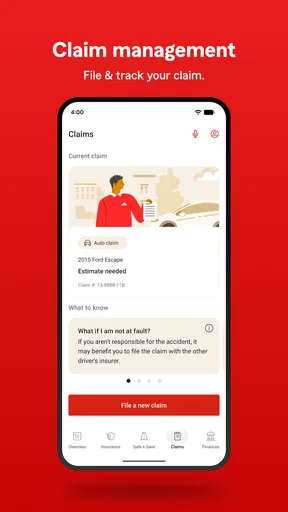
Yes, the app supports claim-related tasks for eligible State Farm customers. You can generally start a claim, provide incident details, upload photos or documents, review updates, and communicate with the claims team. The exact process depends on the type of claim, such as auto, home, or property insurance. Serious emergencies should be reported to the appropriate emergency services first.
Can I make payments and view my insurance documents in the app?
The State Farm® app allows eligible users to manage important billing and policy information without visiting a local office. You may be able to make one-time payments, review payment activity, manage automatic payments, view policy documents, and access digital insurance cards. Payment methods and available options can differ according to your policy, state, and account configuration.
Is the State Farm® app secure and safe to use?
The app is designed to protect account access and personal information using standard security measures, including account authentication and encrypted connections. You should still use a strong, unique password, keep your device and app updated, and avoid signing in over unsecured public networks. State Farm will not normally ask you to share sensitive login details through suspicious messages or unofficial links.
Is the State Farm® app free, and what do I need to use it?
The State Farm® app is generally free to download from the official Google Play Store or Apple App Store, although normal mobile data charges may apply. To use most account features, you need an eligible State Farm account and valid sign-in credentials. Some tools may work only for particular products, while certain services can still require contact with an agent or representative.
